
Free homebrew item tracker for D&D
Write your own homebrew items, track who owns each one, and share an item with your players while your GM notes stay private.
- Free
- No account needed
- Saved in your browser
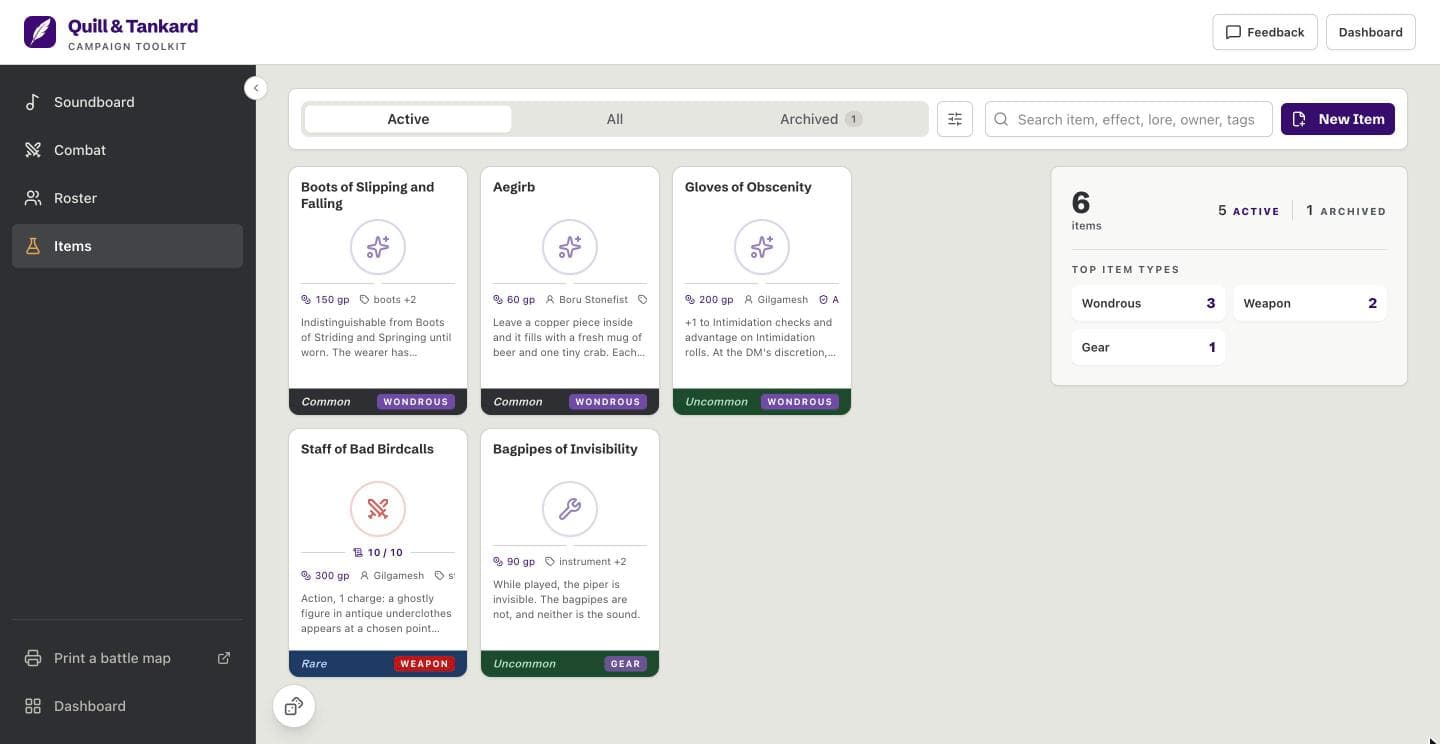
What it tracks on each item
On every item
- Ownership
- Give an item to a PC or NPC from your roster, or leave it unassigned. Filter the list by assigned or unassigned items.
- Rarity
- Pick common, uncommon, rare, very rare, legendary, or artifact. The item’s card shows its rarity as a colored band.
- Attunement
- Turn on “Requires Attunement”, and the card and the player view say so. The app does not track who is attuned or count attunement slots.
In play
- Charges
- Type current and max charges, and the card shows both, such as 3 / 10. Change them as charges are spent. The app does not spend or recharge them for you.
- Archived items
- Archive an item when it is spent, lost, or retired. It leaves the active list and keeps every field. Press “Unarchive” on its card to bring it back.
- Sessions and search
- Note the session an item appears in. Filter the list by session, type, or ownership, or search by name, effect, lore, owner, or tag.
Your homebrew
- Effect and lore
- Write the rules text and the lore in one field of up to 1,000 characters. Link a source document for longer lore in your own notes.
- GM notes
- Keep hidden mechanics and plot hooks in a separate field that only you see. A share link never carries it.
- Type, cost, and tags
- Pick weapon, armor, consumable, wondrous, gear, or custom. Set a cost in cp, sp, gp, or pp, and add your own tags.
Share link
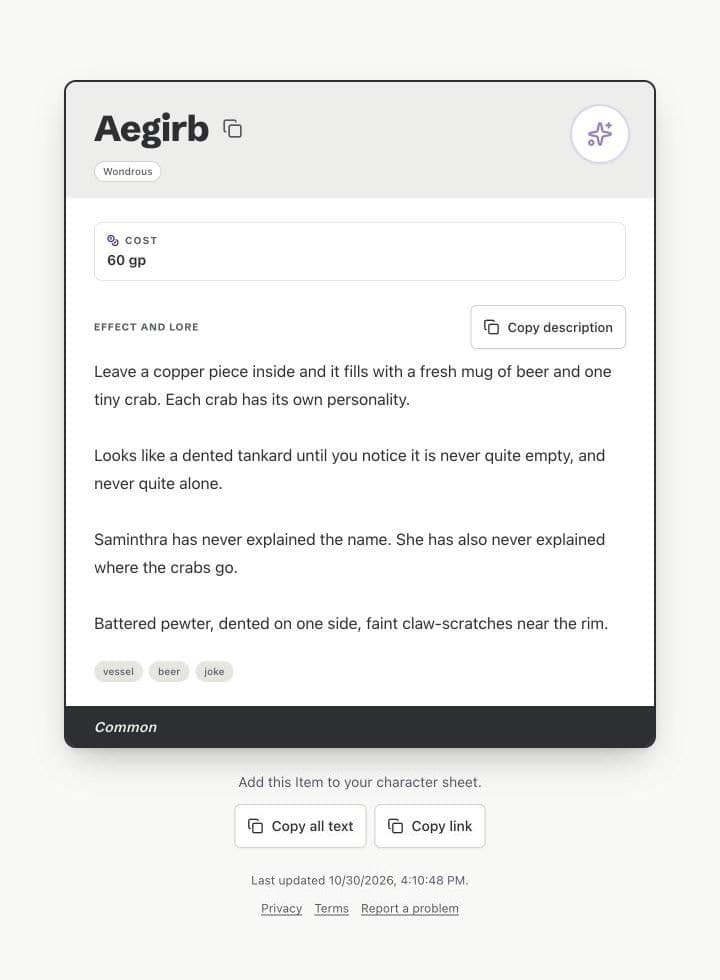
Show players the item and keep your GM notes private.
Players see
- Name, type, and rarity
- Whether it requires attunement
- Max charges and cost
- Effect and lore
- Up to five tags
- When it was last updated
Players never see
- GM notes
- The owner
- Current charges
- Sessions
- The source document
Write, track, and share in three steps
Write the item
Press “New Item”, then write its name, effect, and lore. The app does not generate items and has no item library, so every item is yours. To try the tracker first, press “Add sample items” on the empty list.
Track it in play
Set its owner, rarity, attunement, and charges. Update the charges as they are spent, and archive the item when it leaves play.
Share it with your players
Press “Share” on the item, then copy its share link or show its QR code. Players open it with no account.
Questions
Can I make homebrew magic items?
Yes, you write every item yourself, with its own name, type, rarity, effect, and lore. Effect and lore share one field of up to 1,000 characters. For longer lore, link a source document, such as a Google Doc or a Notion page.
Does it generate items?
No, the app does not generate items and has no item library. A new item starts blank. “Add sample items” puts six examples in an empty list, so you can try the tracker, and you can delete them.
Can my players see an item?
Yes, but only an item you share with them, through its share link. The share link opens a read-only player view. It shows the name, type, rarity, attunement, max charges, cost, effect and lore, and up to five tags. It never shows your GM notes, the owner, current charges, sessions, or the source document. Anyone who has the link can open it, so keep secrets in GM notes, not in effect and lore.
Do players need an account?
No, a player opens the share link and reads the item at once. The player view has no sign-up. A player can copy the item’s name, its description, or all of its text into a character sheet.
What happens to a share link when I edit the item?
Nothing, because a share link keeps the item as it was when you shared it. To show a change, share the item again and send the new link. You cannot turn off a share link, and it still opens after you delete the item.
Where are my items saved?
Your items are saved in your browser, on your device. No server keeps a copy of your campaign, and another browser or device cannot see it. Clearing your browser data deletes your items, so export a backup of your campaign from the dashboard. A share link carries its own copy of what players see, inside the link.
Is the item tracker free?
Yes, the item tracker is free. So are the roster, soundboard, combat tracker, dice roller, and map print. There is no trial and no account.