
Free NPC tracker for D&D
Keep every NPC in one roster with your PCs and monsters, find the right one at the table, and add them to an encounter when a fight starts.
- Free
- No account needed
- Saved in your browser
What it tracks for each NPC
One roster
- NPCs, PCs, and monsters
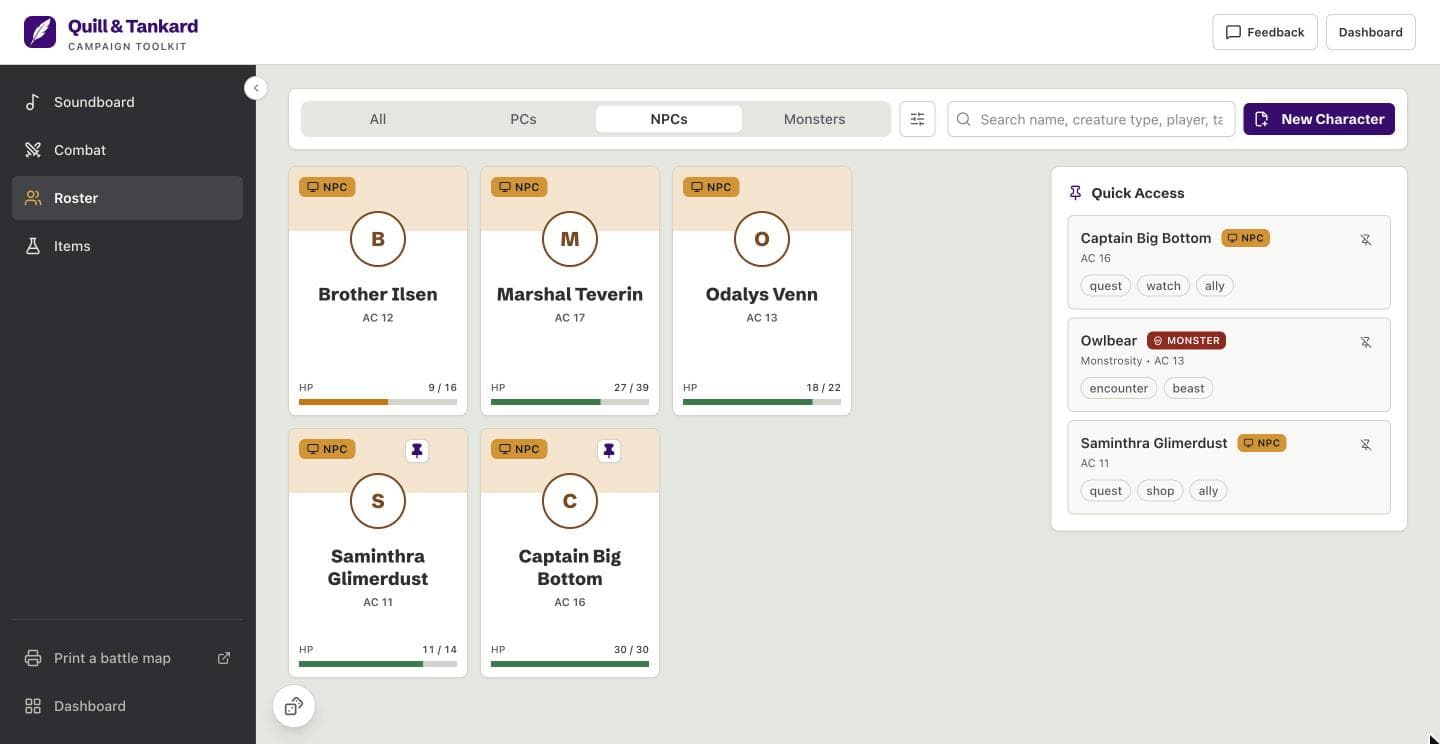
- Each campaign has one roster for all three. Tabs show everyone or one type. Search reads names, creature types, players, tags, and notes.
- HP
- Each card shows current and max HP with a bar. Leave HP blank for a character you do not track, such as a shopkeeper who will never fight.
- Armor class and spell save DC
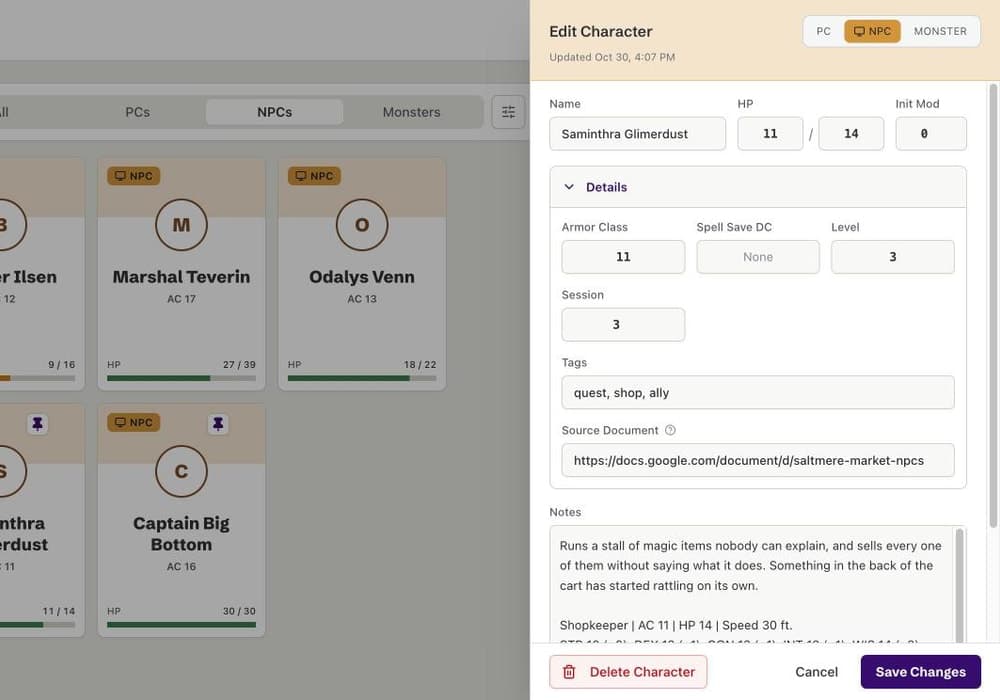
- Any character can carry both numbers. An NPC’s card shows them under its name, so you read them without opening it.
- Initiative modifier
- Each character carries one. In the combat tracker, “Roll opponents” adds it to a d20 for every NPC and monster.
- Class and level
- A PC holds a class, a level, and its player’s name. An NPC holds a level. A monster holds a challenge rating and a creature type instead.
Your notes and lore
- Tags
- Add your own tags, such as “quest”, “ally”, or “boss”. Search for a tag to list every character that carries it.
- Notes
- Write motives, hooks, and secrets in your own words. On a laptop, hover over a card to read its notes without opening it.
- Source document
- Keep full lore where it already lives. Link a Google Doc, Notion page, Obsidian Publish page, Obsidian URL, or PDF, and the icon on the card opens it.
At the table
- Quick access
- Pin any character, and it stays in the quick access panel while you search or filter the roster. Press its name to open it.
- Session filter
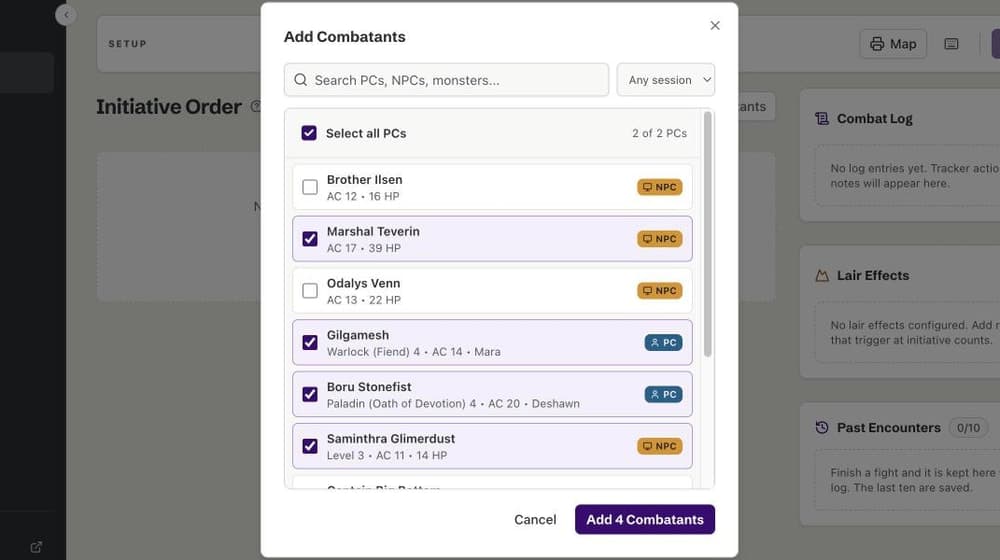
- Give an NPC or monster a session number, then narrow the roster to that session. PCs always stay in the list, because a PC is at every session.
- Add to an encounter
- In the combat tracker, “Add Combatants” lists your roster with the same session filter. Tick who joins the fight. A PC or NPC keeps its HP changes after the fight.
Not a character sheet
The numbers and notes a DM reaches for, on one screen.
A character holds
- HP, armor class, and spell save DC
- An initiative modifier
- A class, a level, or a challenge rating
- Tags, notes, and a source document
It does not
- Track ability scores or spell lists
- Give your players a sheet to fill in
- Generate NPCs for you
Set up your NPCs in three steps
Add your characters
Press “New Character” and choose PC, NPC, or monster. To try the roster first, press “Add sample characters” while it is empty.
Mark who matters tonight
Give each NPC and monster a session number, then pin the characters you want at hand. Open the filter to see one session.
Bring them into a fight
Open the combat tracker and press “Add Combatants”. Each character brings its HP, armor class, initiative modifier, and notes.
Questions
Is this a character sheet?
No, it is a roster for the DM, not a sheet for a player to fill in. A character has no fields for ability scores or spell lists, and players do not open the roster. Type those details in the notes if you want them at hand. It has no inventory of its own either: an item you give a PC or NPC in the items tool shows as a link when you open that character.
Can it generate NPCs?
No, you write each NPC yourself. It has no generator and no NPC library. To see how a finished roster looks, press “Add sample characters” on an empty roster, then edit or delete what it adds.
Can I track PCs and monsters too?
Yes, one roster holds PCs, NPCs, and monsters. Each character is one individual, not a reusable stat block, so six bandits take six characters. In the combat tracker, “Duplicate monster” adds another copy of a monster to that fight.
Do I need an account to use the roster?
No, you open the roster and add your first NPC without signing up.
Where are my characters saved?
Your characters are saved in your browser, on your device. The app keeps no copy on a server. Clearing your browser data deletes them, and another browser or device cannot see them. Export a backup of your campaign from the dashboard to keep a copy.
Is the NPC tracker free?
Yes, the NPC tracker is free. So are the combat tracker, items, soundboard, dice roller, and map print. There is no trial and no account.