
A free digital DM screen that helps run your table
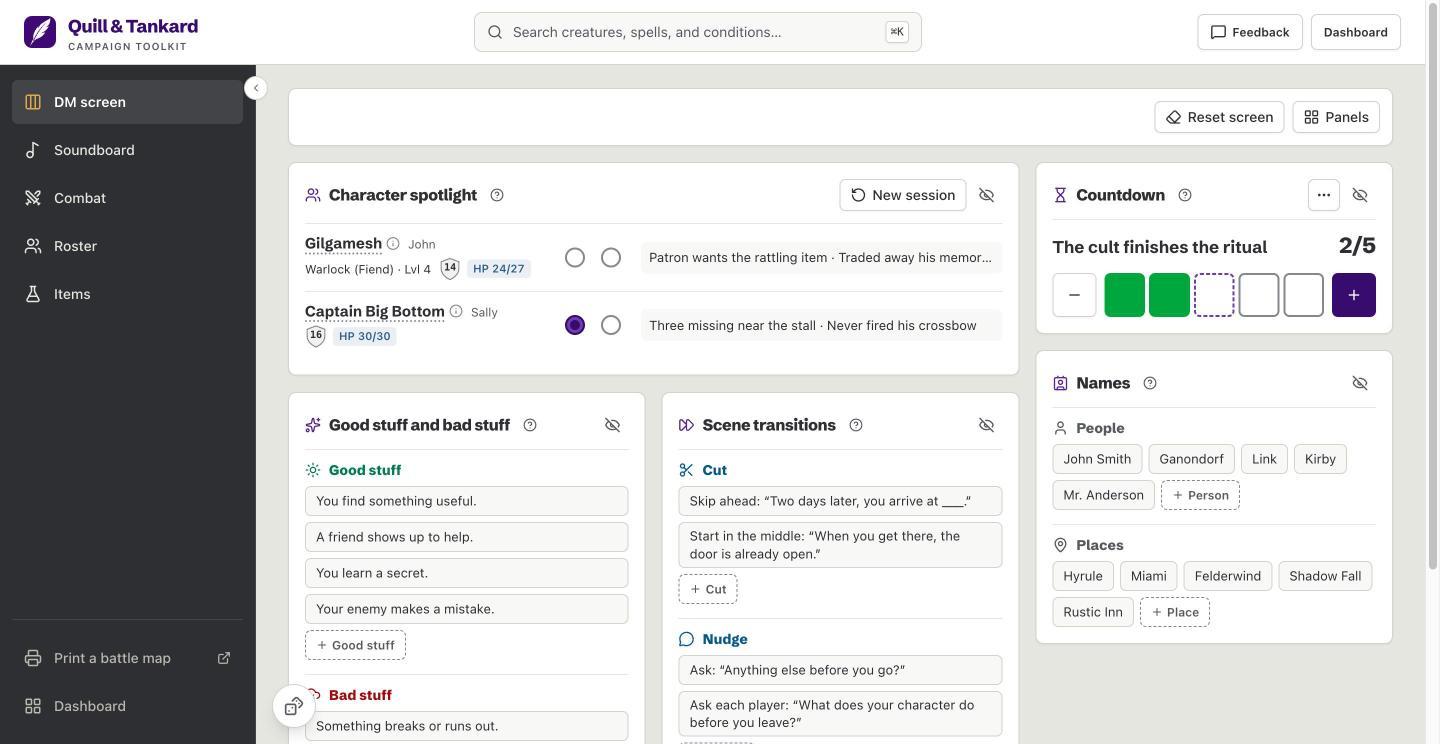
A character spotlight with stakes, a countdown, good stuff and bad stuff for quick twists, scene transitions, and names, all on one screen. Hover a PC to see their full notes.
- Free
- No account needed
- Saved in your browser
Try the DM screen
Sample party. Nothing is saved.
Character spotlight
- JohnWarlock (Fiend) · Lvl 414HP 24/27
- Sally16HP 30/30
Countdown
Something escapes the cart: 2 of 5 steps filled
Good stuff and bad stuff
Good stuff
Bad stuff
Scene transitions
Cut
Nudge
Jolt
Names
People
Places
Free, no account, saved in your browser.
What’s on your DM screen
Your players
- Character spotlight
- Every PC gets a row. Mark a moment when a PC shines, and whoever has waited longest moves to the top.
- Stakes
- Quick notes on what each PC cares about, like a rival or a debt, right on their row.
- Notes on hover
- Hover a PC’s name to see their class, AC, HP, and full notes from your roster.
- New session
- One click fades last session’s moments, so the spotlight starts fresh but still remembers.
Your scene
- Countdown
- A bar of 2 to 8 steps. Fill a step as trouble gets closer. When it’s full, it happens.
- Good stuff and bad stuff
- Ready twists for when you go blank. Good stuff helps the party. Bad stuff makes things harder.
- Scene transitions
- Ways to end a scene: cut ahead, nudge the players to wrap up, or jolt things into action.
- Names
- Names ready for the people and places you make up on the spot. Paste a list to add many at once.
Your layout
- Panels you choose
- Hide the panels you don’t use. Your notes stay, and you can bring a panel back any time.
- Laptop and tablet
- All panels sit on one page, with no tabs to switch. On a phone, they stack.
Set up your DM screen in three steps
Open your campaign
Press “Open the DM screen”. It opens your campaign, or starts one. No account needed.
Fill your screen
Add your PCs to the roster, then jot a few stakes for each. Press “Add suggestions” for ready twists and scene endings.
Run your session
Mark moments as PCs shine, fill the countdown as trouble grows, and grab a twist when you need one.
Questions
Is it an online DM screen?
Yes, it runs in your browser on any device, with no download. Only you see it. It’s free, needs no account, and saves in your browser.
Does it work on a tablet or iPad?
Yes, it works on tablets and iPads, in portrait and landscape. The panels fit your screen, with no tabs to switch. On a phone or an iPad mini in portrait, they stack in one column.
What’s on it?
Five panels: a character spotlight with stakes, a countdown, good stuff and bad stuff, scene transitions, and names. There are no rules tables. Look up conditions, spells, and monsters in the app’s compendium. The demo above saves nothing.